
The visible timestamp was missed
The camera roll knows when the photo was taken, but the date and time are not visible when the image is shared.
Feature · Edit after shooting
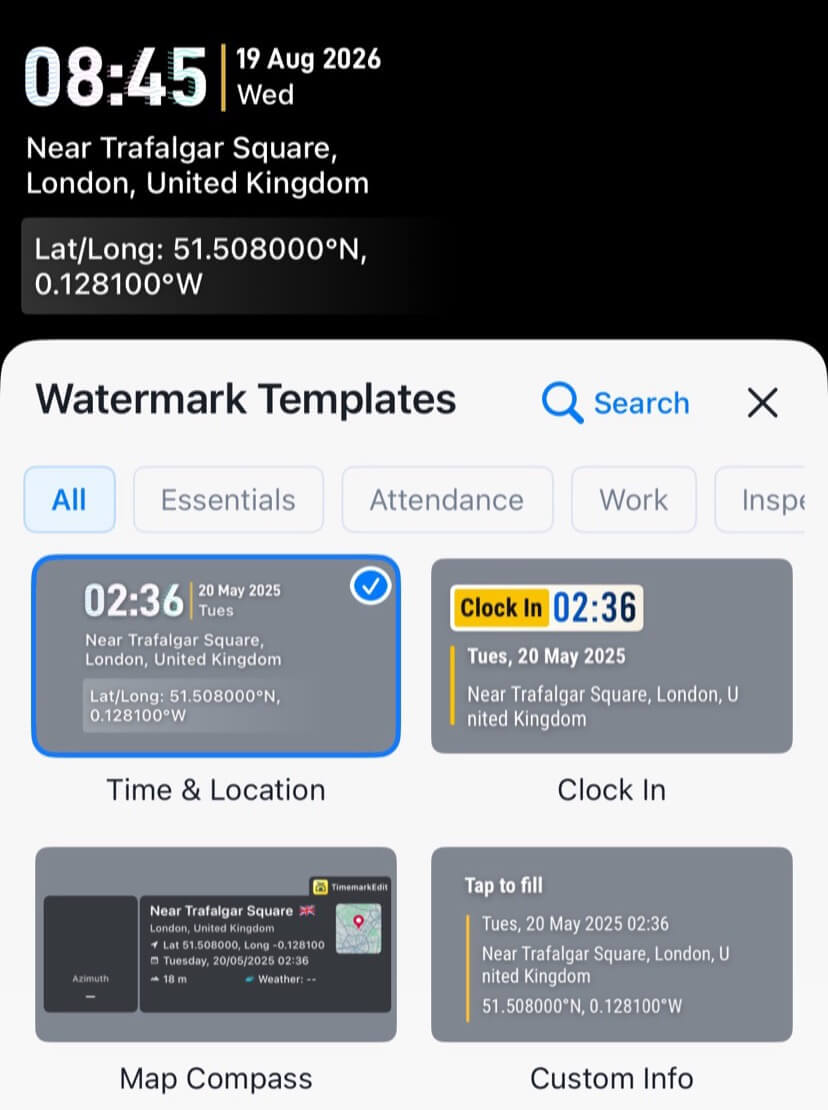
Import an existing photo or video, add or adjust visible date, time, address, and GPS, choose a watermark template, and save the result as an edited copy.
A question people ask
I already took the photos. Can I add the timestamp afterward?
Paraphrased from a public user question
Question shared on RedditUse visible watermarks and supported metadata fields to add context to a separate edited copy.
The camera roll knows when the photo was taken, but the date and time are not visible when the image is shared.
GPS-to-address services can select a nearby entrance, building, or road instead of the actual work location.
Project, room, shift, task, or completion notes may be easier to add after the work moment has passed.
Refer to original information when it is available, then export a separate edited copy.
STEP 01
Choose existing media from your library and open it in the watermark editor.
STEP 02
Use the original capture details as a reference, then add or correct only the fields that need attention.
STEP 03
Add work notes, a logo, or a clear template and export the finished media while retaining the original.
Add a visible date, location, project note, logo, or annotation to a photo or video you already have.
Place date, time, address, GPS, and job notes together in one readable watermark.
Keep an unchanged source file and export edits as a separate version for transparent record keeping.
Transparency
TimemarkEdit edits visible watermarks and supported metadata. It does not certify the original capture time or location.
Yes. Import the photo into TimemarkEdit, review its available capture details, then add a visible date and time watermark before exporting a new copy.
Yes. You can include a visible address, GPS coordinates, and other work details, and correct the displayed information when the automatically selected address is inaccurate.
The recommended workflow is to retain the original and save the completed version separately, so the source and edited copy remain easy to distinguish.
No. A timestamp added or changed after capture is user-edited information. Keep the original and disclose edits whenever authenticity or compliance matters.
Add or adjust date, time, address, GPS, templates, logos, notes, and annotations with TimemarkEdit.